

Walking the Talk

I have a confession to make that I haven’t told very many people.  I use a Kanban board to organize what I do every week. If that makes me an Agile nerd, I guess I’m guilty as charged!

At one point a few years ago I heard of some people at FedEx that weren’t working on an Agile team using a Kanban board in OneNote to organize their daily work. I thought it was wonderful that they were actually using the same Agile practices that we used at the team and organization level in their personal work. It then occurred to me that although I was espousing the use of these concepts as a leader, I was not finding ways to incorporate them in to my daily work as well. Since I like to think of myself as a “practice what you preach” kind of guy I decided to give it a try.

writing notes idea class

For most of my career I have been accustomed to carrying around a journal and making lists of things I need to accomplish. I add to the list as I work through the week and check off items as I complete them.  I had tried making to-do lists on in Outlook before, but it never was as tangible and required me to always go back to my computer to make updates. Inevitably, I would end up going back to my journal. Typically, I would make weekly lists in my journal and check off items as I completed them during the week.  At the end of the week I would copy all the unfinished items to a new page, in addition the new ones that had come up that week, and start over again. It was a good process that wasn’t really broken, but I wanted to see if a Kanban process would really be more effective.

I started by creating a Kanban Section in OneNote and added a page with the “Week of…” date as the title. I then created three equal size columns, “Ready”, “In-Progress” and “Done” using the line drawing tool. I listed all the things that I had written in my journal to accomplish that week in the “Ready” column as separate entries and used Tags to rank them by priority and level of effort. I decided it would be a good idea to WIP limit the In-Progress column, so I wrote a note above it that said, “WIP Limit: 5”. I selected five items to work on that day based on them being time sensitive or easy to knock-out and moved them to the In-Progress column. Once that was all setup, I went about my day.

At the end of each day I would come back to the Kanban Board, that was always up on my screen, and moved things from the In-Progress column to the Done column. Each morning I would take a few more items from the Ready column and move them to In-Progress. By the end of the day Wednesday something strange happened. I ran out of room in the Done column and had to rearrange some things to make it twice as big as the other two columns! I wondered if it was the Kanban process, or that I was getting my usual amount of work done and it just was more noticeable. By the end of that first week, not only had I moved every item that I had listed in the Ready column at the beginning of the week to the Done column, I had completed almost all the items that I had added during the week! I couldn’t remember the last time I got my entire list done before! I recall sitting back in my chair appropriately impressed with this new process.

The next week I copied that page to a new page, erased the Done column and started again. Week after week I was surprised at how much I was able to accomplish with my personal Kanban practice. I have made a few improvements to my Kanban pages over time. I found it useful to create a Backlog list under the Kanban with items that I wanted to do at some point, but were not ready to start on just yet. My tags now represent a cost-of-delay ranking. I move things from the backlog list to the Ready list when I can rate their relative cost-of-delay. I now use tables to make it easier to move items from one column to another. For the most part, the process has served me well. I also find it very beneficial to be able to go back and see all the things I have accomplished when it comes time to write the end of month status or close out objectives for the year.

This is one example of how Lean/Agile methods can be used even if you are a leader and not working on a formal Agile team. Let me know if you have examples to share.


The Trust Factor

One of the most common themes I hear as I talk to IT organizations is that they have somehow lost the trust of their business partners in being able to deliver timely solutions. The first indication of eroding trust is often when the organizations you support begin going to outside vendors to purchase solutions without involving you in the process. While that might be an obvious warning sign, the frustration that is driving them to that option has likely been building for some time. If letting the business directly outsource solutions was an acceptable outcome, you could just accept those losses and move on. After all IT never has enough resources to meet all the demand anyway. Unfortunately, those solutions almost always come back to IT to support once they are implemented. When that happens, they are one-off solutions that require expensive contracts or specialized skills to support and don’t fit into an overall systems architecture. The business got something that works, but now it’s up to IT to support for the next 10-20 years. IT ends up looking inefficient in managing support costs for solutions that are all different and cost too much. Sound familiar?

Every IT organization I have ever seen has more demand for services and new capabilities that it can respond to with the resources it has available. Many IT organizations don’t have a visible way to make business-driven decisions about what the most important priorities are on an ongoing basis. IT organizations that are overwhelmed with demand often make more commitments than they can deliver on successfully. It may also be easy for business stakeholders to dump unfiltered demand on IT and then complain that IT can’t get it all done. This creates long queues of demand that make your business partners wait years for results and just makes matters worse.

I’ve taken on the leadership of organizations in this situation many times and I can attest that reversing this dysfunctional, vicious cycle is one of the most difficult problems an IT leader can face. Trust is a precious commodity that is very difficult to gain and very easy to lose. To reverse the cycle and begin to earn back that it comes down to three important things.

Commitment, communication and culture.

Commitment

Commitment is about managing priorities for the investment the company makes in IT and showing results for the investments that were made. The solution starts with an open dialog about getting your business partners to own their IT priorities and the process of filtering it to ensure that visible tradeoffs are made based on available IT capacity. The business needs to think of IT as a limited resource and take ownership for how they consume it. The demand management process needs to be built around the concepts of queue limits, cost of delay, WIP limits and small batches of work to optimize throughput.

Everyone in your organization needs to know that a commitment to deliver is made jointly at all levels of the organization and between the business and IT. That commitment is taken seriously by everyone that has a role in making it happen. You set the example in the way that you make shared decisions about what your organization works on and measures results on a day-to-day basis.

Communications

At an organization level communication is about providing regular and insightful information about what the company’s investment in IT is delivering in terms of value and services. IT should hold itself to the same standards of performance and contribution to the bottom line that every other department is expected to deliver. Showing accountability through transparent reporting is something that many IT departments don’t have the capability to do or take the time to master. It’s also tempting to not want to show service and support performance metrics until they paint a positive picture about how things are going. It’s good to start with a baseline, even if it’s ugly, and show incremental improvement over time.

At the project level open and transparent communications start from the very beginning as you engage the business to set expectations for how you will work together to achieve common objectives and continues throughout the development process. When things don’t go as planned the best thing you can do is own up to it, resist the temptation to point fingers, and demonstrate a direct and deliberate approach to getting things back on track. Agile organizations make release burn-downs and cumulative flow diagrams of their development teams readily available and visible. Issues are owned and resolved at the appropriate level and by the appropriate stakeholder. Senior management from business and IT stakeholder areas should make a habit of attending system demos and release celebrations. Progress is much more visible in an agile organization and communication is frequent and honest. Nothing is hidden.

Culture

Creating a culture that values engagement and shared success is the best way to earn the trust of your customer or partner. These actions need to start at the top and be reinforced consistently at every level, in every interaction IT has with the business areas they support. Every company has a unique culture, but a few common themes are important to enforce. Teams must be empowered to make decisions that are based on clear mission and direction. There must be a continuous focus on improving everything that the organization does. Leaders must continually reach across organizational boundaries to deliver results and strongly discourage actions that perpetuate silo building and finger pointing.

An agile organization actively embodies the best aspects of culture, commitment and open communications. Agile practices by their nature draw the product owner into the process and engage them in a process of shared success. Commitments are more real-time and reality-based. They are made with the acceptance that change as inevitable. As a lean-agile leader you know how to display a strong sense of commitment in your thoughts and actions. You trust your teams to make the right decisions and do what is best for the customer. I practiced commitment, communication and culture to strengthen and grow trust with my business partners long before I became a lead-agile leader. Agile is not a cure-all for dysfunctional IT-business relationships, but the same concepts run through the value statements in the Agile manifesto – individuals and interactions over processes and tools; customer collaboration over contract negotiation; and responding to change over following a plan. Leaders create a culture in their organizations and companies either deliberately or by default. Which will you choose?

Agile in The Connected Age

pexels-photo-479359.jpegThe Information Age is over. We are now entering what I characterize as the “Connected Age.” The information age began with the widespread use of generally available computing power and flourished with the explosion of the internet. Information became the most powerful commodity and companies depended on having more timely and complete information to compete. In the Information Age Peter Drucker taught us how to manage “knowledge workers”. Industries became “hyper-competitive” with the dot-com boom, bust, and subsequent rise of innovative startups that are disrupting whole industries.

It became apparent to me that the Information Age was coming to a close with the recent congressional hearings with Mark Zuckerberg. Mr. Zuckerberg did what he needed to do. He admitted the mistake and took full responsibility for allowing Cambridge Analytics to harvest data on 87 million Facebook users to profile voters in the last presidential election. The result was largely positive and Facebook’s stock recovered significantly from the huge loss incurred when the news first broke. The more important result of the latest fall from grace of Facebook is the public realization that it wasn’t just in the altruistic business of helping people around the world connect socially and share cat videos. It’s in business to make money and the way it does that is to mine information about all the people that use it and use that information to sell advertising and, yes, sell that information. Information is the product that companies like Facebook and Google are selling. The curtain has fallen and their true mission is exposed. The amazing thing is that even though we knew that, deep down, all along, we were lulled into the allure of their product image. Users of Yelp, Waze, Fandango, Facebook and Google and hundreds of other apps should no longer be surprised that nothing they do online is private and just between them and their browser, cellphone, or their online friends. Now the average, trusting, cellphone addicted person on the street has been exposed to the cold, hard reality of the Information Age. Nor should those companies feel completely beyond contempt when they monetize the information they collect. Facebook and many of its users matured a little last week.

So, what happens now? Probably very little in the habits of social data users, but I think this signals a tectonic shift in the free market that will usher in the next age of competition. That might seem a radical prediction but hear me out. The consumers of services like Facebook, LinkedIn and Google have begun a cultural shift that will result in the acceptance of information as a shared currency and we will move on. As consumers of those online networks, we will accept the invasion of our private lives in exchange for the convenience and value it brings us. That shift will initiate the next major technical revolution in the free market that has been waiting in the wings for the right time to flourish in the consumer market. If we can accept that invasion of our privacy and move on with our lives, what is the next line in the sand?

The next thing that consumers will get comfortable with is letting intelligent, connected products run their lives. The technologies that will enable this new shift are all on the verge of becoming viable in the marketplace. You know what they are… drones, autonomous vehicles, virtual reality, robotics, bio-embedded systems, and artificial intelligence. These technologies will become fully integrated and connected in the products we purchase in next 20 years. They will create a whole new age of connected, situationally aware, autonomous products and services.

What does this mean to the way we manage companies and lead our employees? I predict the Connected Age will usher in the rise of the “innovative worker” and the challenge of “disruptive-competition.” Technology will be a competitive advantage for every industry. It will drive customer interaction and connect companies and their products to the world in ways we haven’t even dreamt of yet. I believe it will be more important than ever for companies to have organizational structures and leadership that can encourage innovation and continuously develop game changing new products and services that utilize the technologies that will dominate the Connected Age. Leadership will need to create systems that reward innovation and actively invest in and develop high-potential ideas. Companies need to be able to harness the variability of the development process and change as quickly as their competitive environment. The hierarchical management structures will need to flatten and accept networks of high-performing, self-managed and collaborative teams. New generations of leaders will need to let go of their corner offices and change the way they engage with those teams. HR departments will need to change how they rate and reward innovative workers and their teams.

How is your company getting ready for the Connected Age?

Agile Leadership & Management – Recent Reads

Memphis BridgeI recently had the opportunity to share some of my experience and thoughts about the interdependence of management roles and Agile organizations at the monthly meeting of the Memphis Chapter of the Project Management Institute (http://pmimemphis.org). The attendees were engaged and asked great, thought provoking questions. One of the questions was, “would you share your suggested reading list online?” This is a very broad and ever-evolving topic, but these books and a host of other articles and research framed my presentation. So, here it is…

  • “The Connected Company”, Dave Gray
  • “Team of Teams”, Stanley McChrystal
  • “Turn The Ship Around”, David Marquet
  • ”The Seventh Sense”, Joshua Cooper Ramo
  • “The Future of Management”, Gary Hamel
  • “Leaders Eat Last”, Simon Sinek

What is an Agile IT Organization?

space-desk-workspace-coworking.jpg

The current economy is fueling a constant stream of new startup companies that are disrupting industries with their ability to combine products and services in new ways, deliver them very quickly, and make them easily accessible through technology. Business agility is not just a worthy goal in today’s economy, it is vital for long-term survival.

To remain competitive a business must be able to continuously develop new products or services that delight customers. The process a company uses to development new products or services is the lifeblood of a company’s heartbeat. The goal of the product development process is to produce a unique and different result from anything that has been produced before. If the result of the process is a solution that is sufficiently different in a way that adds incremental value for a customer, the process will be considered successful. If the result of the development process doesn’t produce incremental value – like a new product feature – it is at best, valuable learning opportunity. Of course, a customer can be defined in many ways other than the purchaser of goods or services.

Some organizations make the mistake of treating the development process as another aspect of the manufacturing process. The goal of manufacturing process is to repeatedly produce a product the same way with as little variability as economically possible. I once got into a debate with an internal audit manager because he was insistent that we should be able to control the level of quality of our development process through compliance to policy.

The product development process is inherently highly variable and involves calculated risk taking. Many companies accept the risk of a high percentage of their development efforts failing so they can realize a significant payoff for a select few. The development of a product or solution can involve the design of a physical device, electronic components, software components, or the workflow of delivering a service. The optimal development process effectively manages variability to produce a solution that optimizes future benefit for the least amount of investment of time and resources. The goal of optimizing the development process is not to minimize variability and risk, but instead effectively managing it to produce the right solution, at the right cost, at the right quality, at the right time. “At the right time” means responding to customer demand as it manifests.

Organizational agility is measured by the time it takes for an organization to execute an optimal development process from idea to implementation. In agile speak – from concept to cash. So then, my definition of an agile IT organization…

An agile IT organization is a business entity that is focused on relentlessly optimizing their process of developing technology-based solutions that contribute to the overall ability for the company to quickly and continuously deliver new products or services to the marketplace.

I cannot think of any current industry where the most relevant businesses are not dependent to a significant degree on effectively utilizing technology to connect to their customers. It follows that for a business to remain relevant and competitive, it must be able to deliver IT solutions quickly and gracefully as integral part of their development process. At the most basic level, an IT leader has the ultimate job of ensuring that their peers that run the day-to-day operations of the business understand the interdependency between business agility and IT agility.

It should be every leader’s mission, no matter what organization or business unit they manage, to ensure their company relentlessly improves its level of business agility. This agility should be 100% focused on providing value to their customers. Companies that have executives entrenched in legacy thinking will struggle to remain relevant. The mission of relentless improvement in business agility should drive any agile transformation initiative from the outside in.

Think Products, Not Projects!

pexels-photo-842654.jpegThe ability to consistently develop new products and services that delight customers is the lifeblood of a company. Developing a product-based mindset and moving away from a project-based mindset is an important first step to creating a culture that is focused on the customer. This is a foundational difference between companies that just “practice agile” and those that truly are agile.

In many corporations that produce products and services that rely on software, the traditional unit of work is defined as a project. The Marketing or engineering teams typically create a project charter to describe a scope of work that the IT organization needs to deliver to create a product or service or enhance an existing product or service. Corporations use projects to define their accounting processes, drive forecasting and budgeting, and define the structure of organizations and teams. For accounting purposes, the development of new software is capitalized and the support of the software in production in expensed. Teams of people with various skills are formed to work on projects and then disbanded when the project is finished (or fails to deliver results and is cancelled). Teams are made up of people from various silo organizations matrixed together to perform various aspects of the development process. Budget is allocated to the project in large phases and not evaluated until al

l the scope for that phase is complete. The focus of a project manager is to minimize the critical path of the project to deliver 100% of the scope as fast as possible. All that sounds pretty good. The only problem is, as we have heard many times, most projects fail to deliver the planned results on schedule and on budget.

In contrast, many companies manage everything they do around the lifecycle of the products they sell. From a product management perspective, the company focuses on managing the lifecycle of a product to optimize customer satisfaction. Teams are assigned to develop various product capabilities and stay together as those capabilities are delivered to the market. A product owner has the responsibility to define the most valuable features of the product based on direct customer feedback. The product owner’s definition of the critical path is the minimum set of features that can be delivered as quickly as practical in the form of a minimum viable product (MVP) that delight the customer. The product owner continually evaluates the incremental improvements to the product based on the value they provide to the customer. Funding can be diverted to features that show high value and diverted away from features that deliver lower value at any time during the development process. The work that the team does can be systematically tracked by tasks completed in each sprint to differentiate capitalized development and expensed support. The team is motivated to produce a high-quality product because they will own the support of it long-term. If a new product development effort fails to produce the value expected, the work of the team can be quickly diverted to other, more valuable products or services. Calculated risks are accepted as the cost of innovation and sunk costs are minimized when ideas fail to deliver value. The team stays together and is not blamed for the failure.

Even though product management makes so much more sense than project management, making the shift from project management to product management seems to be one of the toughest paradigm shifts for large corporations to accomplish. The project concept has been so ingrained in the accounting and management structures of most corporations that making the shift can be very counter-culture. In traditional, project-based corporations, people judge their worth by how many important projects they are assigned at the same time. The heroics of people on blot-out-the-sun, do-or-die projects becomes part of the folklore of the company. The worth of mid-level managers is often judged by their ability to get project funding proposals approved. Projects inject new budget wealth into their organizations, justify hiring and expanding organization domains, and put leaders in the spotlight for those regular updates to the senior executives. The concept of doing away with projects strikes fear into the hearts of most middle management. Perhaps this is one of the reasons why “Company philosophy or culture at odds with core agile values” and “Lack of m

anagement support” continually shown up as 2 of the top inhibitors to the success in adopting Agile practices.

Making the transition to a product-based management paradigm is one of the foundational aspects of moving to a more agile business model. It’s not just semantics. IT’s about managing the lifecycle of products and services in a much more deliberate way. It will likely require a long-term structural change to the IT organization. Most IT development organizations have been born and raised around large projects. A product management approach will work more effectively if the development teams are aligned to developing and supporting functional capabilities fundamental to the corporation’s products or services. Capabilities, in this context, are defined as functions and competencies that are inherent to how your company delivers and supports its products or services. Scaled Agile refers to the processes that support capabilities as “value streams”. Capabilities and the value streams that support them can either deliver value directly to a customer or support internal business functions needed to operate the company like payroll or accounting.

Making the mindset shift to product lifecycle management will require getting your engineering, marketing, finance, HR and accounting peers on board with the benefits associated with that change. You’ll need to incorporate it into the plan for change that you lead with your peers.Leading the change to, and sustaining a product-focused business model, is one of the critical roles we have as an Agile leaders.

People – Process – Technology, Repeat

Concepts like digital transformation, DevOps and hybrid cloud are the latest marketing efforts to sell solutions in the agile transformation space. Implemented correctly they can have dramatic impacts to how a company delivers technology solutions. The hype would lead you to believe that buying the right DevOps product or cloud service will lead directly to the benefits of an agile development pipeline. DevOps is not merely a set of technical solutions that are installed and magically change how teams work. DevOps is a set of continuous integration and continuous delivery disciplines and practices, enabled by integrated products implemented by people in specific roles. Cloud solutions can provide consistent, repeatable environments on demand for companies to deploy and support applications. But, without an effective organization to deliver applications using agile processes, having a cloud infrastructure at your disposal will not impact much other than your yearly IT expenses.

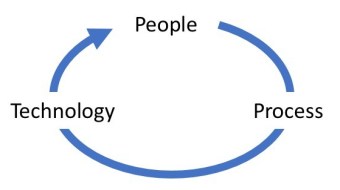
In addition to strong lean/agile leadership, effective agile transformations require equal focus on three areas that can be summed up as People, Process and Technology. It’s not just about focusing on all three concurrently, but in the right order.PPT Graphic

The focus on people begins and ends with mindset and culture. A people-first approach is critical to increase the chances of successful transformational change. A culture of ownership in the change must be cultivated and nurtured for people to feel an emotional connection to the change effort. Many organizations drive change through a process-first effort and end up with people saying the right words and half-heartedly walking through practices, but not truly embracing change. The result is often that little positive change really happens and the morale in the organization degrades. The people in the organization must have a direct emotional connection through ownership in their future to truly want the change to happen. Once that connection is established, they can collectively build a development process that they believe in. As that process begins to take shape products and technologies can be introduced to fuel and accelerate the change.

In large IT organizations, it can be difficult to involve enough people in defining the change effort to give a sense of ownership for each organization. The result is that some organizations feel left out, don’t buy into the new efforts and go their own way. To some extent that will happen and can’t be fully avoided, but it can be minimized. It’s important for leadership to show solidarity and commitment to the change effort. When senior leaders make a change effort a contest to see who finishes first, they are undermining the success of the larger change effort. Instead they should set an example of involvement and commitment to the larger effort. That will demonstrate trust in the recommendations of the teams driving the initial change efforts and motivate involvement from their teams. The change leaders can also involve various organizations by soliciting broad involvement in centers of practice to define improvement goals and process frameworks.

In addition to a culture and mindset foundation, the focus on people includes hiring and retaining the right people, getting them in the right roles, empowering them with the skills they need, and structuring organizations and teams to match the capabilities you need to sustain market growth. Once those basic needs are satisfied, a people focus evolves into developing a learning organization that can quickly evolve as the market changes. Companies are finding that teams thrive when they have enough structure to get started and the freedom to self-organize based on their specific needs.

The focus on process is about building a product development and support lifecycle that provides guidance, manages risk and variability, and provides context for decision-making while enabling positive change. Too much focus on a prescriptive process will stifle positive change and too little guidance will devolve into chaos and constant firefighting. I use the term “process” to cover the more general set of strategies, frameworks, methodologies and practices that define how teams develop and support products and services. Self-managed teams need terms of engagement and clarity of mission to make good decisions with minimal oversight. The use of a high-level framework, guiding principles and strategies, and a toolbox of practices that teams can utilize and expand on to meet their specific needs is an emerging pattern for success in the industry.

A focus on technology is about providing solutions for teams to collaborate across various locations, work effectively within process frameworks, and have visibility into the work they are doing. It’s also about having reliable and repeatable environments to develop, test and deploy solutions available on demand so they can deliver at their own speed. These technologies make the development process more repeatable and fuel the rate of change in an organization. A strategy for implementing for a portfolio of purchased solutions, developing loose integration between those products, and constantly evolving those solutions will be important. The IT organization needs to set standards for solutions that provide consistent metrics and regulatory compliance and allow flexibility at the “edge” where teams will be continually experimenting with new solutions that give them an advantage.

Once efforts are in place in all three areas of people, process and technology the transformation focus should circle back to people and continue that cycle again and again. That repetitive cycle is managed best as an agile cadence to reinforce the cultural change. As the people on the edges of the organization adopt the new processes they will go through stages of maturity and waves of rejection and acceptance. The importance of establishing a mindset of continuous improvement through regular team-based introspection is critically important. Teams need to take ownership of their own continuous improvement focus. This is often referred to as the shift from “doing agile” to “being agile.” A holistic business and IT agility strategy needs to focus equally on people, process and technology. If any one of those three legs of the transformation are neglected it will be on shaky ground!

Are IT Managers Obsolete?

pexels-photo-70292.jpegThe VersionOne Agile Industry Survey has listed “Company philosophy or culture at odds with core agile values” and “Lack of management support” as 2 of the top 5 reasons cited as inhibitors to success in adopting Agile practices for the last 11 years running. Apparently, no one has made much progress in resolving that problem!

These issues can be symptoms of a larger IT leadership opportunity. It’s well known that traditional, top-down leadership can hinder, or completely smother, an agile IT transformation. So why aren’t more IT leaders embracing the new mindset of agile? The root cause of the problem might just be that leaders tend to hang on to their old ways of managing because their new management roles in an agile organization are not well defined.

Agile consultants and training programs focus on the importance of coaching and the roles played by the Scrum Master and Product Owners. They touch briefly on the different management styles and make recommendations on styles that are more conducive to leading Agile teams, but don’t provide much guidance to managers and mid-level executives on the role they should play in an Agile organization. If structured, hierarchical organizations are a thing of the past, what place do IT leaders have in the new unstructured organizations?

The leading agile frameworks recommend that managers take on an administrative management role to support their teams. There are roles for Scrum Masters, Product Owners, UX Designers, and Architects, but the role of the Agile Manager, Agile Director, or Agile VP are left open for interpretation, or even worse, for extinction. The recommendation they propose is that managers focus on hiring, rewarding, funding, and otherwise enabling high-performing teams. The mid-manager now is a supporting role for the team instead of a functionally critical part of what the team does. In fairness to agile frameworks like LESS and SAFe, the topic of management’s role is outside the scope of their main mission. I have the upmost respect for each of these frameworks and have studied both extensively. They provide excellent guidance on how to scale Agile practices in a large organization. My goal is not to call out their deficiencies, but to make a more general point about the uncertain future for managers swept up in an Agile transformation effort.

A change initiative needs to generate a sense of urgency for change, have a compelling vision for the future, and a credible plan on how to get from current state to future state. In most change initiatives, the future state for IT leaders is murky at best. Most IT leaders I know are more than willing to adopt a lean/agile mindset but tune out when the conversation turns to the topic of organizational change. Future organization planning is often only a topic for closed door meetings and hushed hallway discussions. The feared “R” word (reorg) strikes fear into the troops and creates churn in the ranks that destroys productivity. IT leaders also fear that critical resources will jump ship early if they don’t see a place for themselves in the future organization.

Keeping the future organization plan secret, or worse, up to chance is even more disruptive to a transformation than addressing it outright. If left up to chance, the result will likely be that the new organization will look pretty much like the old organization. A better approach is to have your leaders involved in making decisions about the future organization. If your leadership team knows that fewer team managers will be needed but more product managers will be needed in the future, they can begin to position themselves accordingly. The more notice they are given to plan for a future role in the organization, the more valued they will feel. If your Directors and Managers have a role in designing the value stream or large solution organizations for the future organization, they will be more committed to making them successful.

Future IT management roles will be aligned to the future structures of agile organizations. This will require mid-level management to develop expertise in leading demand portfolio teams, Agile Release Trains, Large Solution programs, system teams, and matrixed teams with functional disciplines.